
How to Use the Monkee Mods Mini 4WD Builder

Before buying upgrade parts, put your current Mini 4WD on the Builder’s parts board. A stock Raizzan is a useful first example because the catalogue can identify the main assemblies while still showing which details you need to check against the manual or the car.
1. Load the Raizzan 18663
Set Start from to Exact kit and choose Raizzan (ME chassis), item 18663. Under Rule profile, select Box Stock planning. For a kit-only plan, start with the listed kit contents and leave add-ons empty. If you enter a different class, select its profile and read the organiser’s published rules before choosing parts.
2. Open a flagged check
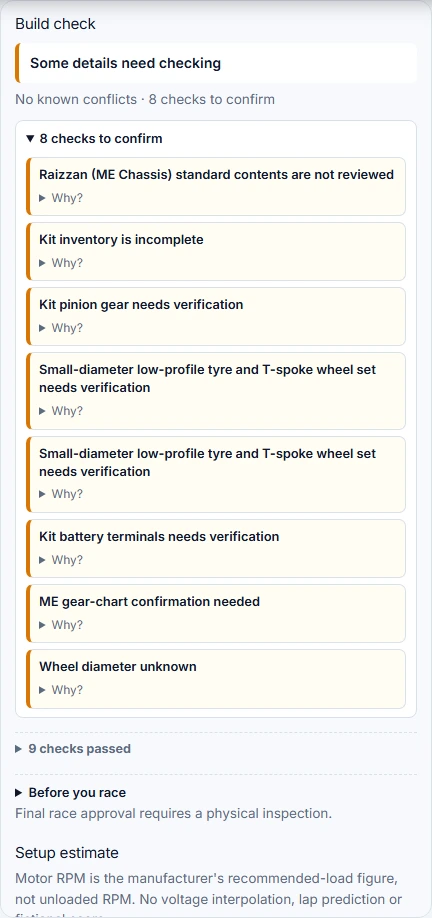
In Build check, open the group of details to confirm and read an individual check. The Raizzan has a partial parts inventory. For example, the catalogue identifies six rollers but leaves their exact mounting positions for manual review. Find where they go in the kit instructions. The 3D schematic helps you locate assemblies, and the 2D parts board remains available if 3D fails to load.
3. Save the plan and inspect the car
Enter a name such as Raizzan 18663 in Build name, then use Save build to keep a copy in this browser. Copy link gives you a shareable URL that runs the checks again when opened. Build sheet exports a record to take to the workbench. After assembly, measure the car and check clearances and parts against the event rules. Final race approval requires physical inspection.
Frequently asked questions
Where is a saved build stored?
It is saved in the browser you used. Keep a share link or export the build sheet if you need a separate copy.
What does a review flag mean?
Open the check to see which specification, installation detail or physical measurement needs confirmation.